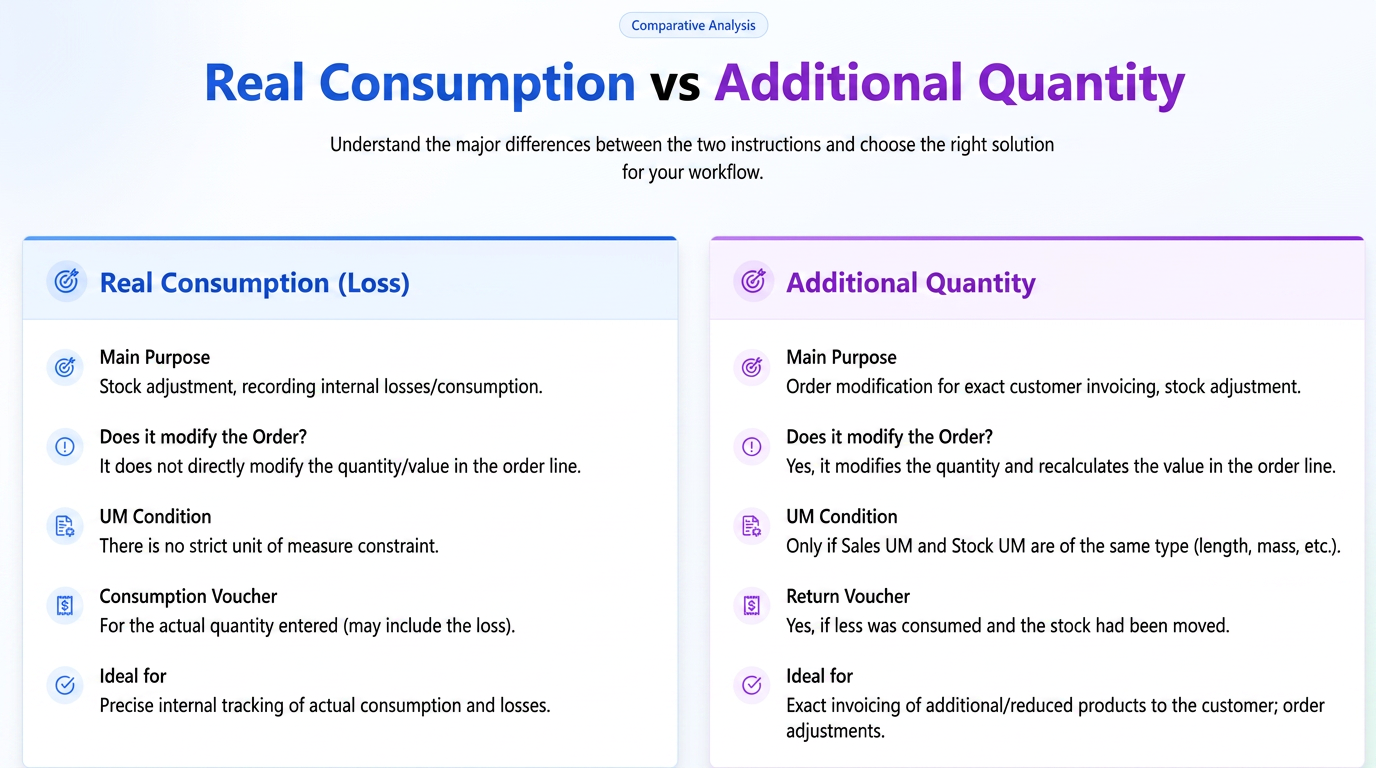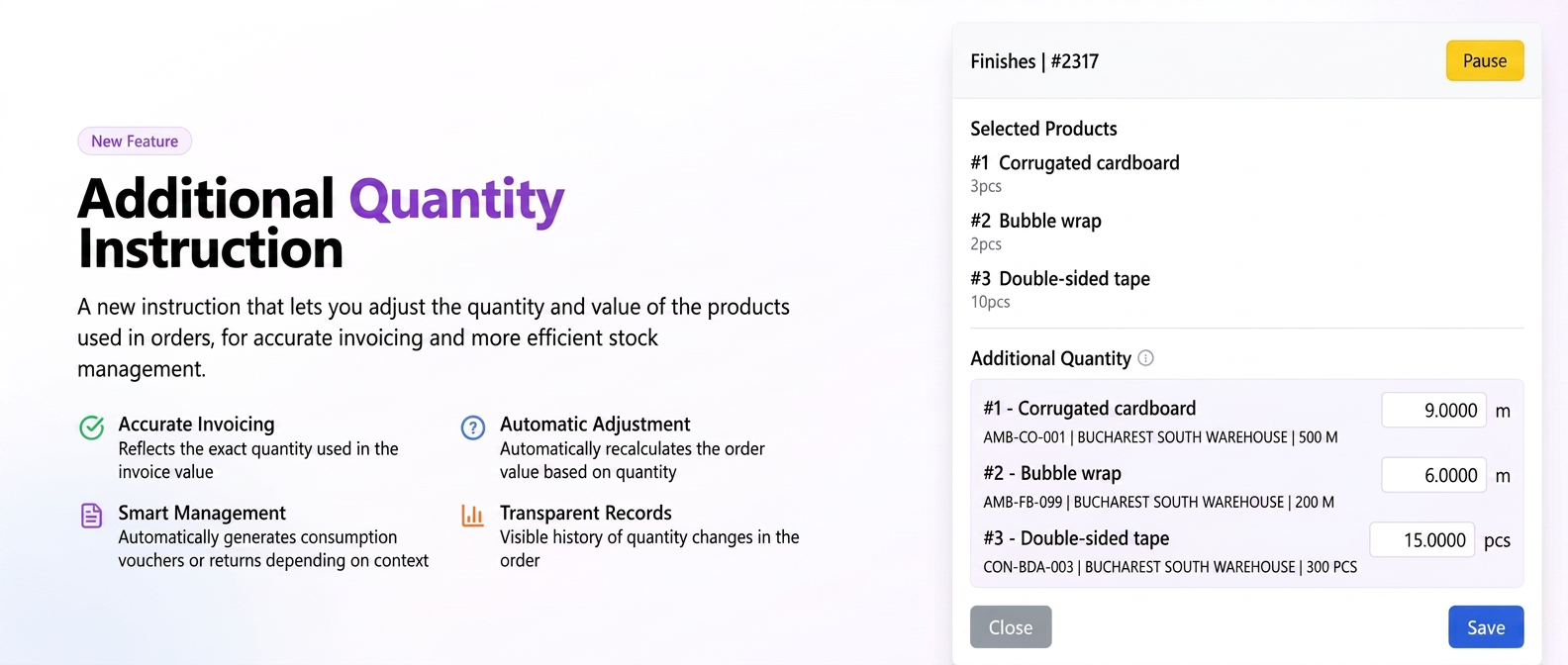
This instruction was created to provide flexibility in situations where it is necessary to invoice the client for the exact quantity of product used (especially when it exceeds the initial estimate) or when you want to adjust the order (quantity and value) if less product was used than planned. Unlike "Real Consumption (loss)", the "Additional Quantity" instruction directly modifies the quantity and implicitly the product value in the order line.
- Detailed Functionality and Conditions of Use:
- Essential Condition for Use (UM Compatibility):
The "Additional Quantity" instruction is functional only if the Sales Unit of Measure (UM) and the Stock Unit of Measure (UM) are of the same type. This means that both must represent the same measurement category (e.g., both are units of length, both of area, both of mass, both pieces, etc.).- Unsupported Examples: Sales UM = sqm (area) and Stock UM = pcs; Sales UM = sqm (area) and Stock UM = m (length).
- Important: The instruction acts on an existing product line in the order and does not have the function of creating new order lines.
- Implications for Ordering and Billing:
- Modifying Quantity in the Order: The quantity of the product specified in the order line will be updated to reflect the new total quantity actually used, entered by the operator via this instruction.
- Recalculating Value in the Order: The "Value" column for the respective product line will be automatically recalculated based on the new quantity and the unit price, directly influencing the total value of the order and, implicitly, the amount to be invoiced.
- Super-Products: If the modified product is part of a super-product, the value of the super-product will not be automatically recalculated immediately. However, a special button will be displayed on the order editing interface that will allow manual recalculation of the super-product value to include the changes.
- Essential Condition for Use (UM Compatibility):
- Detailed Operation Scenarios for "Additional Quantity":
The instruction intelligently manages stock movements, generating consumption slips or return slips depending on the context:- a. Exceeding the order quantity (stock not yet moved for the initial order):
- iflows Action: The product quantity in the order is updated to the new entered value (higher). The product line value is recalculated accordingly.
- Stock Movement: A single consumption slip will be generated for the new total quantity.
- Example: Initial order: 6m. The operator enters via instruction: 8m. The customer order will update to 8m. A consumption slip will be generated for 8m.
- b. Exceeding the order quantity (stock already moved for the initial quantity in the order):
- iflows Action: The product quantity in the order is updated to the new entered value (higher). The product line value is recalculated.
- Stock Movement: A consumption slip will be generated only for the additional difference.
- Example: Initial order: 6m (for which a consumption slip has already been generated and stock moved). The operator enters via instruction: 8m. The customer order will update to 8m. A new consumption slip will be generated for 2m (the difference between 8m and 6m).
- c. Entered quantity is smaller than the order quantity (stock not yet moved for the initial order):
- iflows Action: The product quantity in the order is updated to the new entered value (smaller). The product line value is recalculated.
- Stock Movement: Implicitly, upon finalizing the order, the consumption slip that will be automatically generated (if the workflow is so configured) will be for this smaller quantity.
- Example: Initial order: 6m. The operator enters via instruction: 4m. The customer order will update to 4m.
- d. Entered quantity is smaller than the order quantity (stock already moved for the initial quantity in the order):
- iflows Action: The system will issue a warning to the operator, informing them that the stock for the initial quantity has already been processed. The product quantity in the order is updated to the new entered value (smaller). The product line value is recalculated.
- Stock Movement: A Bon de restituire (Return Slip) will be generated for the unused material difference.
- Example: Initial order: 6m (stock moved). The operator enters via instruction: 4m. The customer order will update to 4m. A return slip will be generated for 2m.
- a. Exceeding the order quantity (stock not yet moved for the initial order):
- Display in the Order Interface:
For transparency, information regarding adjusted quantities will be visible on both the order details page and the editing page, at the level of each affected product line. When hovering the mouse cursor over the modified quantity, a tooltip will display details about the movements:- Example for excess: "Additional Quantity 8m, Initial Quantity 6m"
- Example for lower consumption: "Quantity 4m, Initial Quantity 6m"
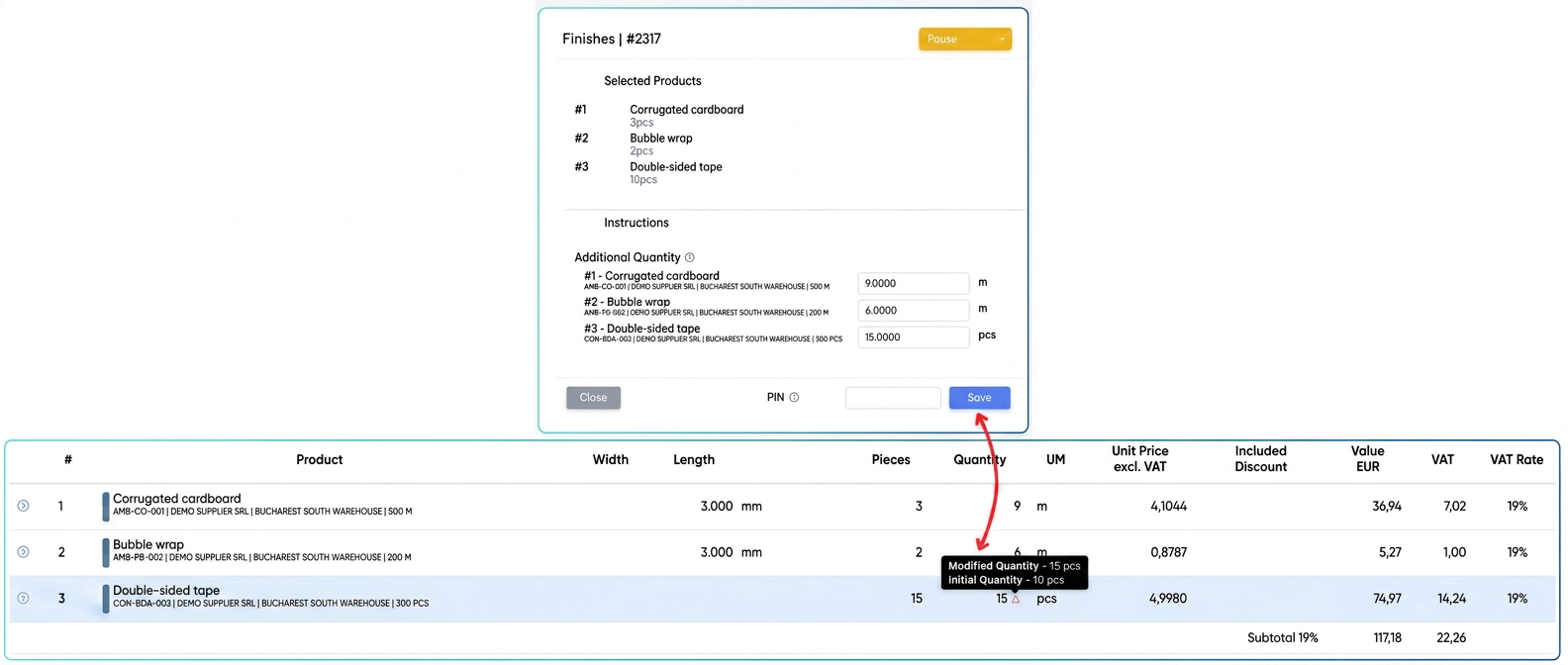
- Implementation in the Stocks Page:
Return slips generated by this instruction will be visible and manageable in the "Stocks" module, similar to consumption slips, but will bear the distinct name "Bon de Restituire" (Return Slip), allowing for clear records of materials returned to stock. - How to use:
- In "Settings" -> "Workflow", add the "Additional Quantity" instruction via drag & drop into the desired action (e.g., Finalization) of the relevant stage in the production flow.
- During the production process, when that stage and action are reached, the operator will have the option to enter the total quantity actually used for that product.
- The system will automatically process the changes in the order and generate the stock documents (consumption slip/return slip) according to the scenarios described above.
3. When is the "Additional Quantity" Instruction Useful?
This new instruction is ideal in the following situations:
- When it is essential to invoice the client for the exact quantity of material used, especially if it is higher than originally estimated in the order.
- When you want a precise adjustment of the order value (and implicitly the invoice) in case less material was used than planned.
- To provide flexibility in the production process, allowing for fine adjustments of consumption directly in the workflow, with an immediate impact on the quantity and value in the order and, subsequently, on the accuracy of stock records.