
- Comments with Reminder: In addition to adding a regular comment, users can set a reminder that sends an email with the comment details, ensuring that important tasks or reminders are not overlooked.
- Scheduling notifications: You can now specify a date and time for the notification to be sent, automating the reminder process and ensuring the team receives messages at the right moment.
- Targeted notifications: Users can select the employees who need to receive the notification.
Steps for use:
- Accessing the workflow stage: If you already have the Comments instruction set in a workflow stage (for example, in the Start, Pause, Resume, or Finish stages), when accessing that stage, you will be able to write a comment, just as before.
- New button: Next to the comments field, you will now notice a new button called "Reminder". This allows you to activate automatic notifications.
- Activating the Reminder: After activating the Reminder button, you will have the possibility to choose the date and time you want the notification to be sent.
- Selecting employees: After choosing the date and time, you can add one or more colleagues who need to be notified. Select the employees from the available list.
- Sending the notification via email: At the selected date and time, employees will receive an email containing the information you entered in the comments field, ensuring that the message and tasks are communicated at the right time.
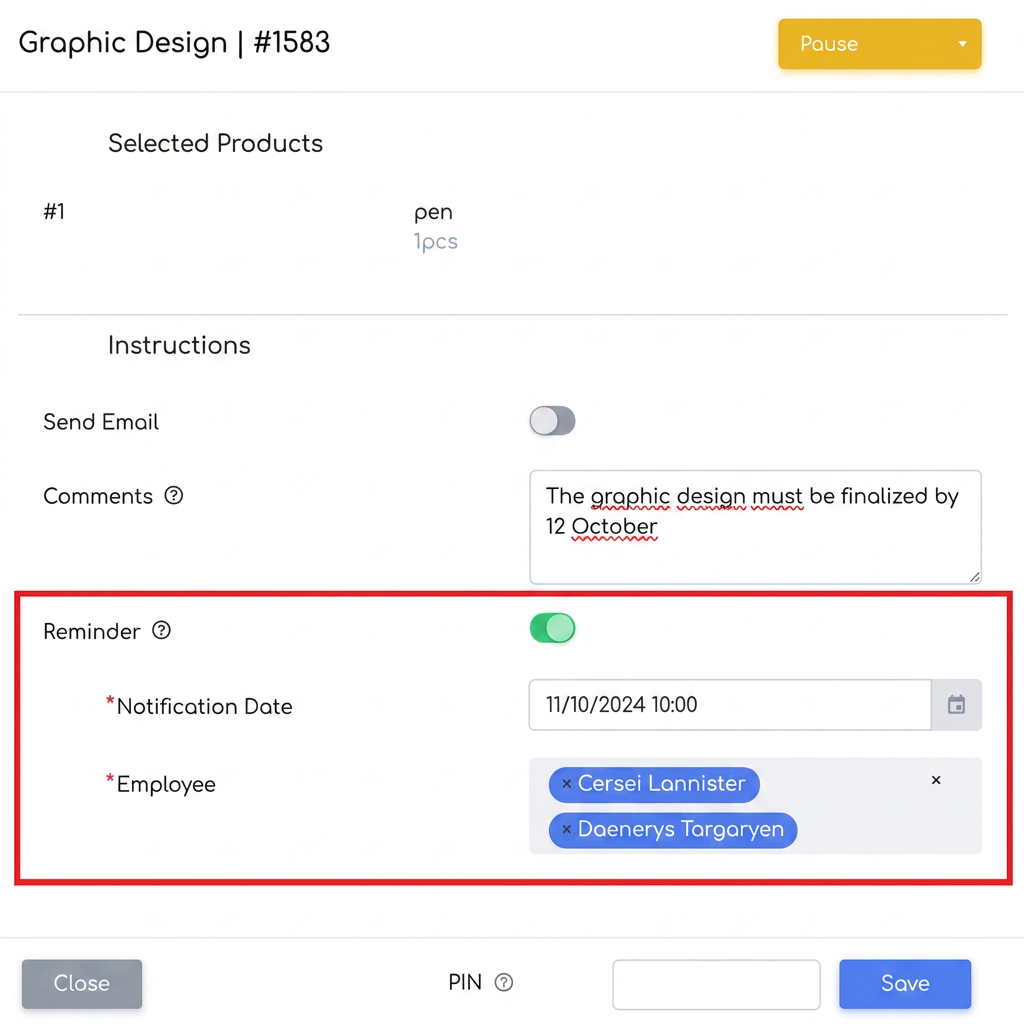
Use Case Examples
1.Suppose we have a Procurement stage. We start the stage and order the goods from the supplier. We set the "Comments" instruction at Pause, where we will write the estimated date the goods are to arrive. By activating the Reminder function, the date and time are set for when the employees responsible for receiving the goods will receive an email notification. Thus, they will be automatically alerted to check if the goods have arrived and to initiate the reception and processing procedure.
2.Suppose an advertising agency needs to launch a campaign on November 1st. For the launch to be successful, all promotional materials must be sent to print by October 27th. In the graphic design stage, add a comment noting the intermediate deadline, and using the Reminder function, set a notification for October 26th for the design team, reminding them they have one day left to finalize the materials before sending them to the print shop.
3.An accounting department must prepare all documents for a client's annual audit, scheduled for March 15th. However, all financial reports and files must be reviewed and sent to the audit team by March 10th. In the document preparation stage, add a comment specifying this deadline and set a Reminder for March 9th, reminding the accounting team they have one day left to finalize the document review before the audit.