
The time worked by each employee on projects is automatically tracked by the system in a transparent manner. The process works as follows:
Picking up a stage: The moment an employee picks up a stage from an order/project, the system automatically begins monitoring the working time. This represents the actual time the employee spends on that specific task.
Monitoring working time: Tracking continues until the employee either completes the stage or puts it on pause. If the stage is paused (for example, if they need to wait for additional resources or other approvals/the work schedule ends), tracking stops automatically and will resume from the moment the employee decides to restart the stage.
Time reporting: The system records all time worked on each stage, and this data is available in two main places:
- Order History: Within the details of the order the employee worked on, you will be able to clearly view how much time was allocated to each individual stage.
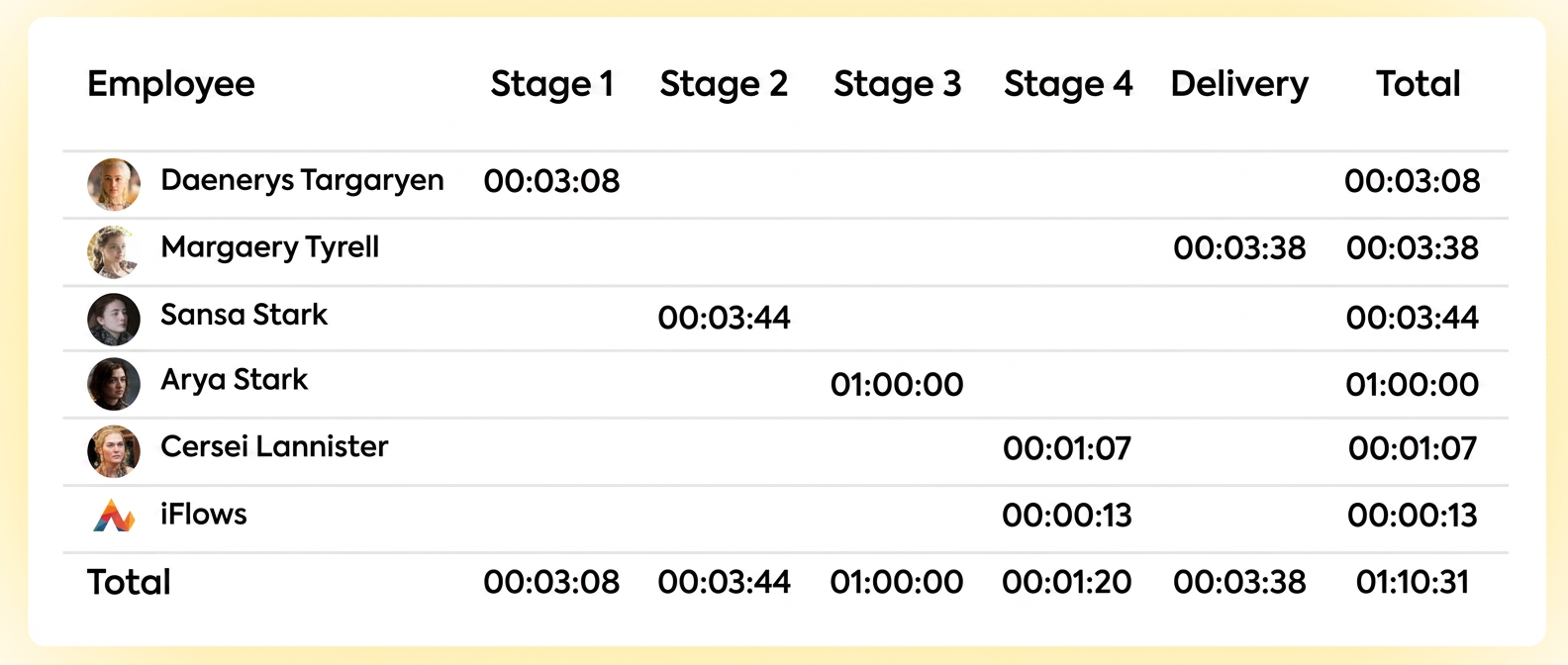
- Employee Reports: The total time worked by each employee is centralized and can be viewed in Employee Reports.
Thus, you have transparency and details at the order level, as well as an overview and performance analysis. This allows you to monitor the progress of each task in real-time and, simultaneously, evaluate the productivity of the entire team over the long term. For a better understanding of how you can evaluate employee performance, we recommend watching the video tutorial: Employee Performance Evaluation.