
1. What is it
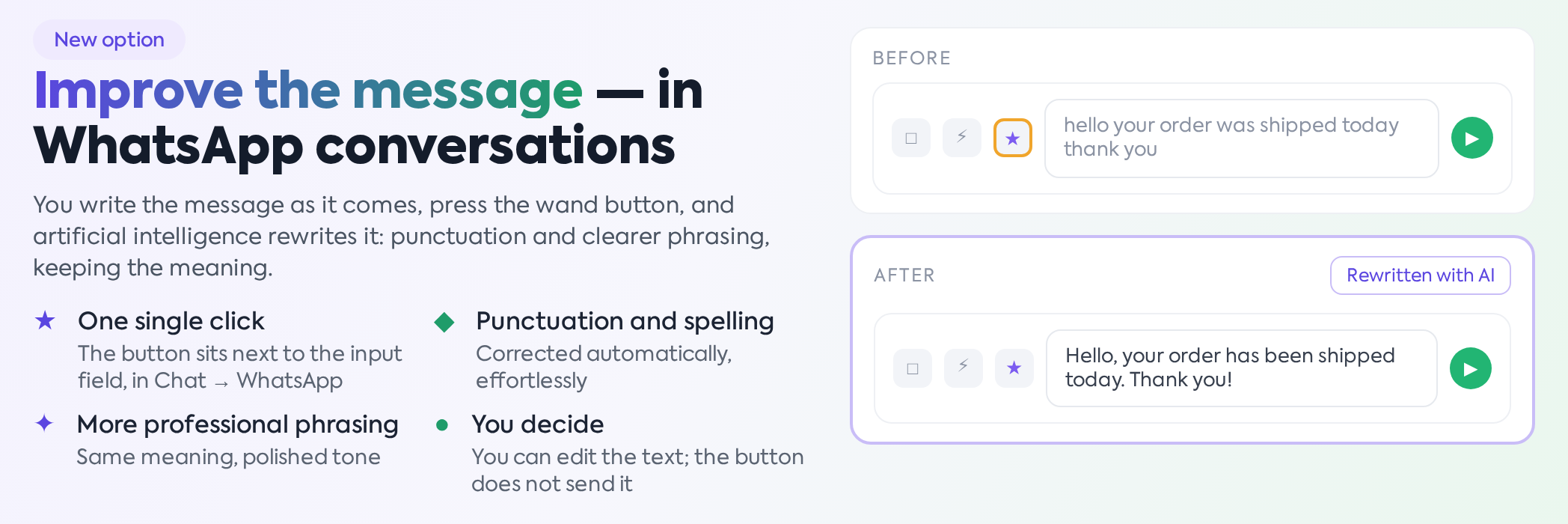
In WhatsApp conversations (), next to the message input field, the "Improve message" button (wand icon) has been added. This rewrites your message using artificial intelligence: it adds diacritics, corrects punctuation, and improves phrasing while preserving the meaning. The text is sent for processing to the iFlows artificial intelligence service and is not saved in the platform; only the message you actually send ends up in the conversation.
2. How to use it
Write the message as it comes to mind, then press the button:

The written message, before improvement — button highlighted.
The text in the field is replaced with the improved version:

The same message, after pressing the button.
You can still modify the text before sending it — the button only rewrites the content of the field, it does not send the message.
The button is only active as long as the conversation is within the 24-hour window, which is the interval in which WhatsApp allows free-form messages to be sent to the customer. Outside this interval, the button appears disabled, and upon clicking, you receive the message "You cannot improve messages outside the 24h window.".
Text replacement cannot be undone within the platform: after pressing the button, the originally written version can no longer be recovered. If you value the message exactly as you wrote it, copy it before pressing the button.
While the text is being processed, the icon turns into a waiting indicator, and the button remains locked so you don't start two processes in parallel. Usually, the response arrives in a few seconds.
3. Situations where text does not change
The function is designed to never break the message you wrote. If the artificial intelligence service does not respond, returns an error, or produces an unusually long result, the platform keeps the original text without displaying an error. Basically, if you press the button and the text remains unchanged, the processing was not successful; you can try again.
There are also a few explicit messages, displayed as notifications, where the text remains untouched:
"The message is empty." — you haven't written anything in the field.
"The message contains inappropriate language and could not be processed." — the text was rejected by the content filter.
"AI service is not configured. Contact the administrator." — the platform does not have the artificial intelligence service key configured; this is resolved by the iFlows team.
Processing has a maximum timeout of 60 seconds and does not restart automatically.
4. Who has access
The button is available to any user who has access to WhatsApp conversations, without a separate permission: if you see the WhatsApp chat, you see the button. It works the same way on a phone, in the browser.