
The "Self-Invoice" function automates the import into iFlows of invoices issued on behalf of your company by third parties via ANAF e-Factura (commonly in cases of energy suppliers). The function automatically creates both an Order (marked as completed, without entering the Workflow) and a Sales Invoice identical to the document in e-Factura, for traceability, collection, and reporting.
1) Accessing the function
To use this functionality, navigate to the menu:
→ "e-Factura" tab.
This section displays all invoices sent and received through the ANAF e-Factura system.
2) Identifying a self-invoice
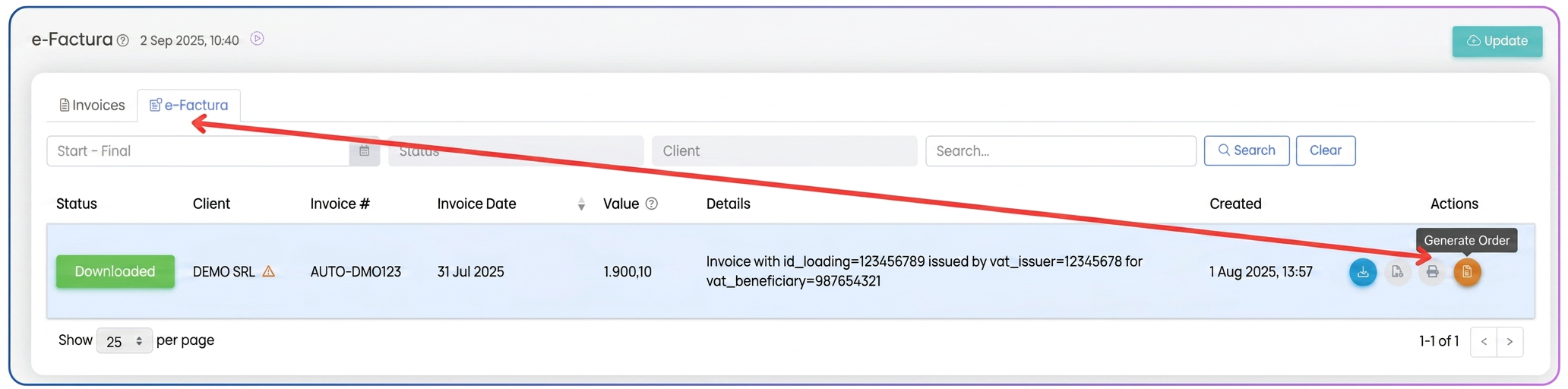
A Self-Invoice type invoice is distinguished by a visible element in the "Actions" column:
- next to it, a new orange button appears, named "Create order".
- this button is available exclusively for self-invoices.
Thus, if you see this button, it means the respective document is a self-invoice and can be processed automatically in iFlows.
3) Generating the order and invoice
To complete the process:
- Press the orange "Create order" button.
- The iFlows system will automatically generate:
- An Order, marked as completed (it does not go through the operational workflow);
- A Sales Invoice in , importing all data from e-Factura (products/services, quantities, prices, VAT, total value, customer).
4) Benefits
- No manual data entry is required;
- Complete traceability is maintained (Order ↔ Invoice);
- The created invoice can be used directly for marking collection and for internal reporting;