
-
-
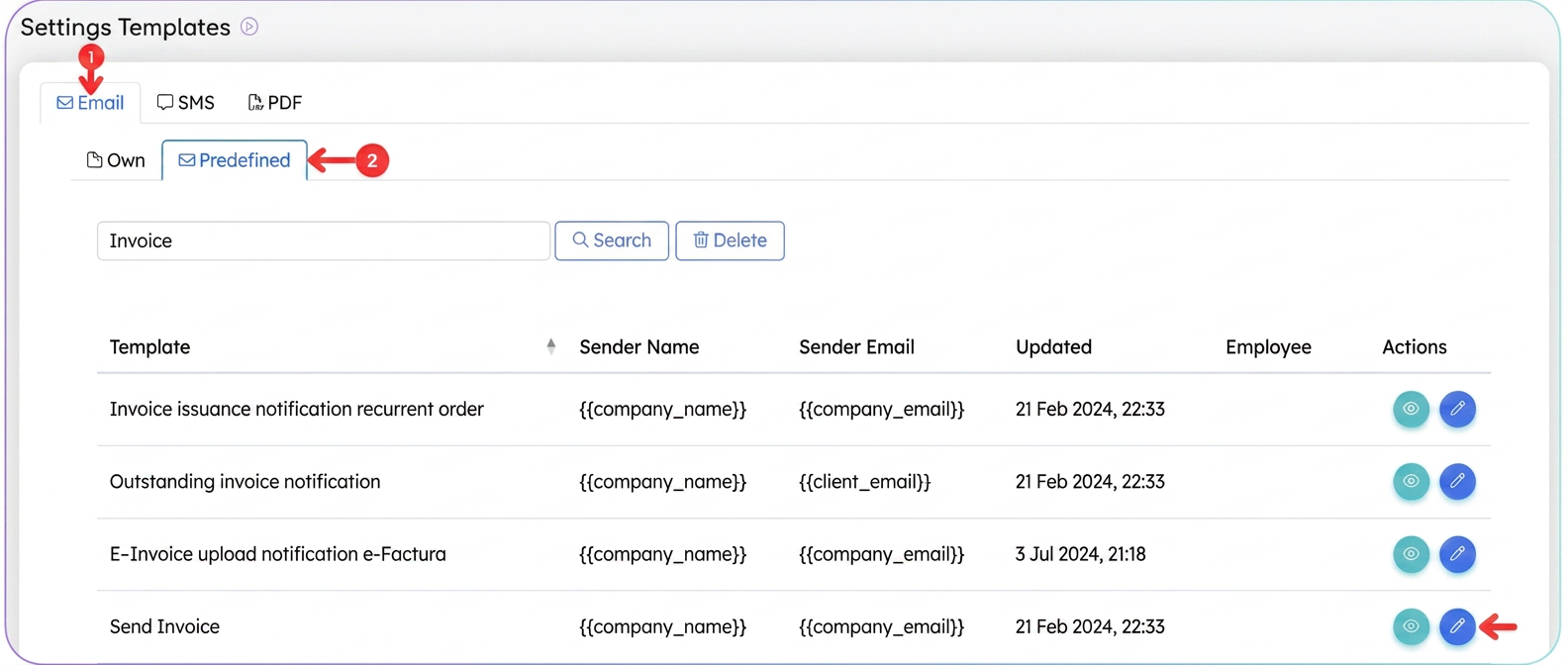
Select the "Predefined" tab
- Here you will find the standard templates provided by the system.
- Locate the template titled "Send invoice" and press the Edit icon.
-
Edit the subject and content of the email
- In the text editor, you can modify the message content addressed to the client. You can add, delete, or rewrite phrases to convey the exact information you want.
-
Use the available variables
- On the left side, under "Variable Fields", you will find a list of predefined variables (e.g.,
{{company_name}},{{invoice_series}},{{invoice_number}},{{client_email}}, etc.). - Click on the desired variable and it will be automatically inserted into the text in the form
{{variable}}. - At the time of sending, iflows will fill these fields with real data: the invoice series and number, client name, company details, etc.
- On the left side, under "Variable Fields", you will find a list of predefined variables (e.g.,
-
Save and test
- Press the "Save" button to confirm the changes.
Note: BCC: If you want to receive a copy of the message every time (for archives or internal control), enter the email address(es) separated by commas. The recipient will not see the address entered in the BCC field.