
The form functionality in iFlows is deeply integrated with the CRM (Clients) module. The "Client" section in the configuration of a form template is specifically designed to create or update a client record in the system.
To prevent duplicates, iFlows attempts to validate if a client already exists using a unique identifier:
- CIF (Fiscal Identification Code) for legal entities or CNP (Personal Numerical Code) for individuals.
If your form has the "Client" section active but does not include a field for CIF/CNP, the system has no way to verify uniqueness. Therefore, to ensure no information is lost, the platform will create a new client every time, even if data such as company name, email, or phone matches an existing client.
How can you prevent the creation of duplicates?
There are two effective methods, depending on the purpose of your form.
Solution 1: When you want the form to create a new client (lead capture) or update an existing client's data:
This approach is ideal for forms that need to be linked to a specific client profile.
Purpose: To allow the system to identify the existing client and associate the data correctly without creating a duplicate.
Steps to follow:
- Navigate to Marketing -> Forms and edit the respective template.
- In the "Client" section, ensure you have a row for the unique identifier. Click on "Add Row".
- In the dedicated field, write "CIF/CNP" (or any other text relevant to the client).
- In the "iFlows Field", select the "CIF/CNP" option from the list.
- Optional, but recommended, check the "Required" toggle to ensure this field is always filled in.
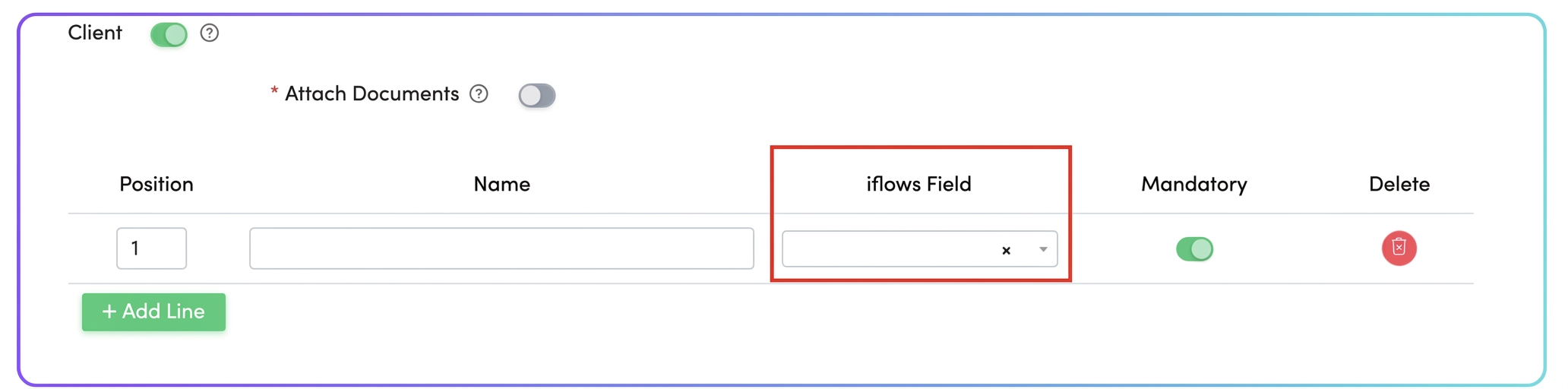
Effect: When a client fills out the form and enters their CIF/CNP, iFlows will recognize the client and associate the data with the existing record. If the CIF/CNP does not exist, it will create a new client.
Solution 2: When the form has a strictly operational purpose and SHOULD NOT modify client data (e.g., feedback form, delivery/installation request, event registration).
This is the best solution for collecting specific information without risking alteration of the client database.
Purpose: To collect necessary data without creating or modifying client profiles in the CRM.
Steps to follow:
- Navigate to Marketing -> Forms and edit the respective template.
- Completely deactivate the "Client" section using the green toggle next to the title.
- Scroll down to the "Client Information" section (make sure it is activated).
- Here, add all the fields you need to identify the client (e.g., Company Name, Contact Person, Phone, Delivery/Installation Address, etc.) using the "Add Row" and "Add Field" buttons. These fields will collect information without automatically mapping them to the main client profile in the CRM.
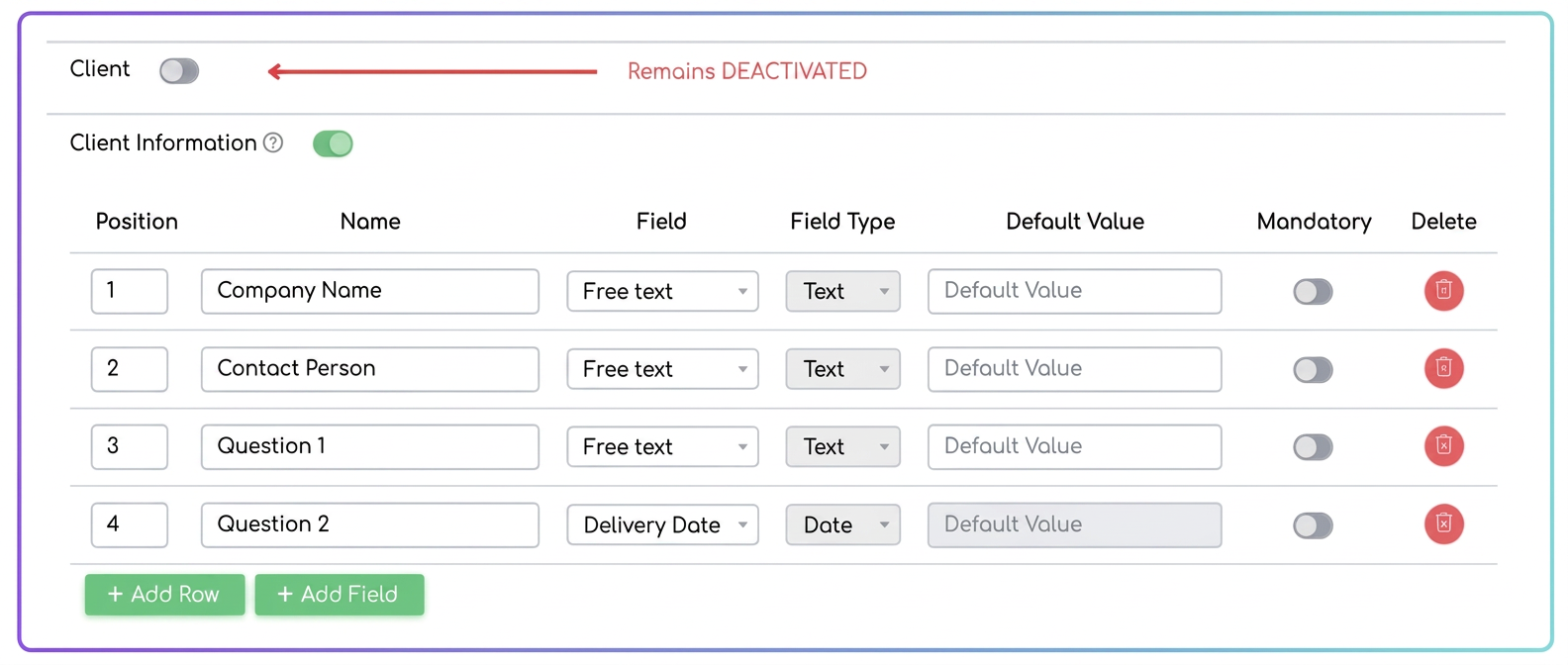
Effect: The completed information will be saved and visible in the form details, but will no longer automatically create new clients or duplicates. The data remains collected in an organized manner, strictly within the operational context for which the form was created.
Why is CIF/CNP the Unique Identifier (and not the Name)?
To maintain an accurate database without duplicates, iFlows uses a unique identifier to recognize each client. The name, while it may seem sufficient, is not a secure method.
- For Individuals: Names repeat. There can be thousands of clients named "Popescu Ion". Without a unique identifier, the system cannot distinguish between them, risking mixing up orders and data. The CNP is unique to each person and completely eliminates this problem.
- For Companies: A company's name can be written in multiple ways (CLIENT DEMO SRL, CLIENT DEMO S.R.L., SC CLIENT DEMO SRL). For the system, each variant would mean a new client, leading to the creation of duplicates. The CIF (CUI) is a unique code that identifies the company without error, regardless of how the name is written.