
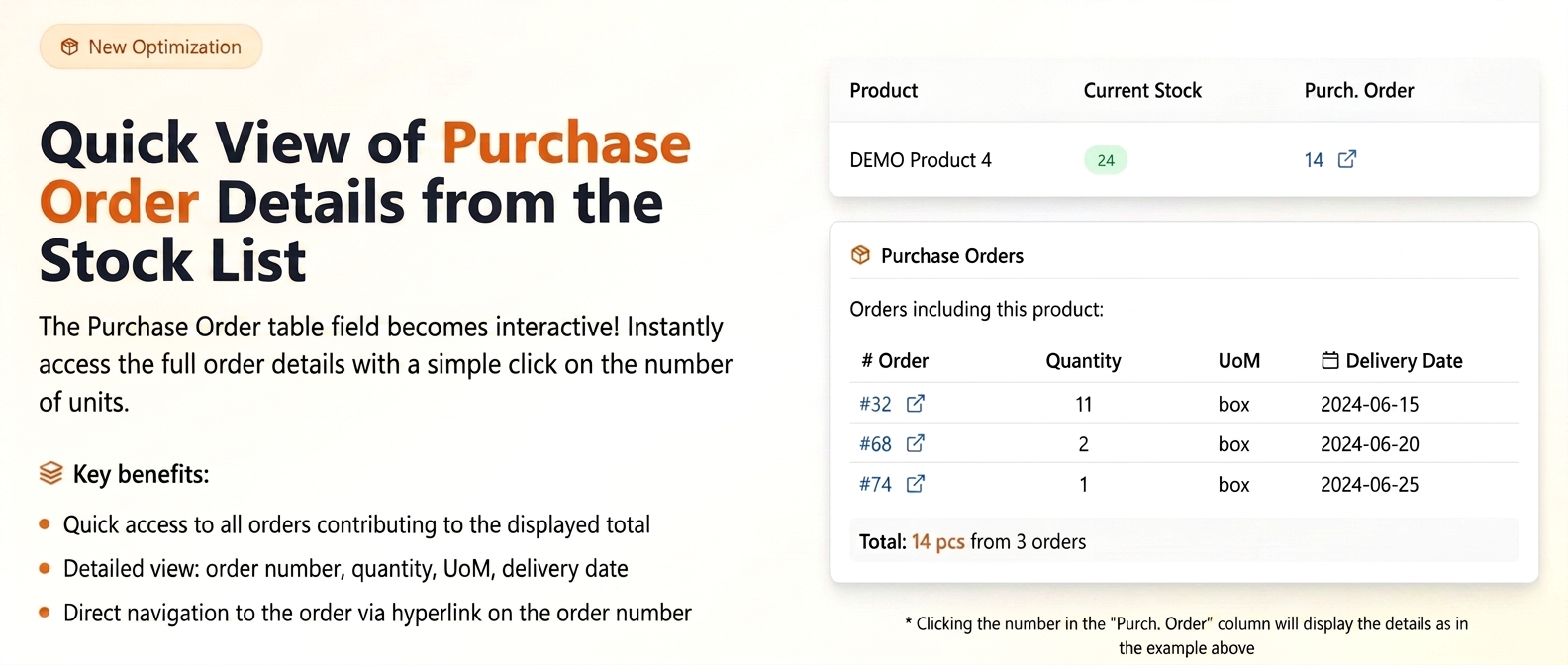
The "P.O. Qty" (Purchase Order Quantity) column, visible in the stock list (accessible via Products -> Stocks), displays the total number of units of a specific product that have been ordered from suppliers and are pending. A key feature is that the number of units in this column acts as an active hyperlink.
How to Use and What the Benefits Are:
-
Quick Access to Detailed Information:
-
Navigate to the Products section and then select Stocks.
-
In the displayed table, locate the product of interest.
-
In the "P.O. Qty" column, click on the number indicating the total units ordered for that product (for example, if "14" units are displayed for "EXAMPLE Product", click on the number "14").
-
-
Displaying the Informative Pop-up:
-
Upon clicking, a pop-up window will instantly appear on the screen.
-
This window contains a detailed list of all purchase orders that include the selected product and whose cumulative quantities form the total displayed in the "P.O. Qty" column.
-
For each individual order listed in the pop-up, the following information is presented:
-
Purchase Order Number: The unique identifier of the order.
-
Quantity: The number of units of that product included in that specific order.
-
Unit of Measure (UM): The unit of measure used for the product in that order.
-
Delivery Date: The estimated date when the products from that order are scheduled to be delivered.
-
-
-
Benefits – Transparency and Efficiency in Stock Management:
-
Clarity: This functionality provides a clear and quick overview of the source of expected product quantities, allowing for the identification of specific purchase orders.
-
Improved Tracking: Facilitates monitoring of supplier deliveries by having estimated delivery dates available for each batch of products.
-
Efficient Planning: Contributes to better stock planning and goods reception.
-