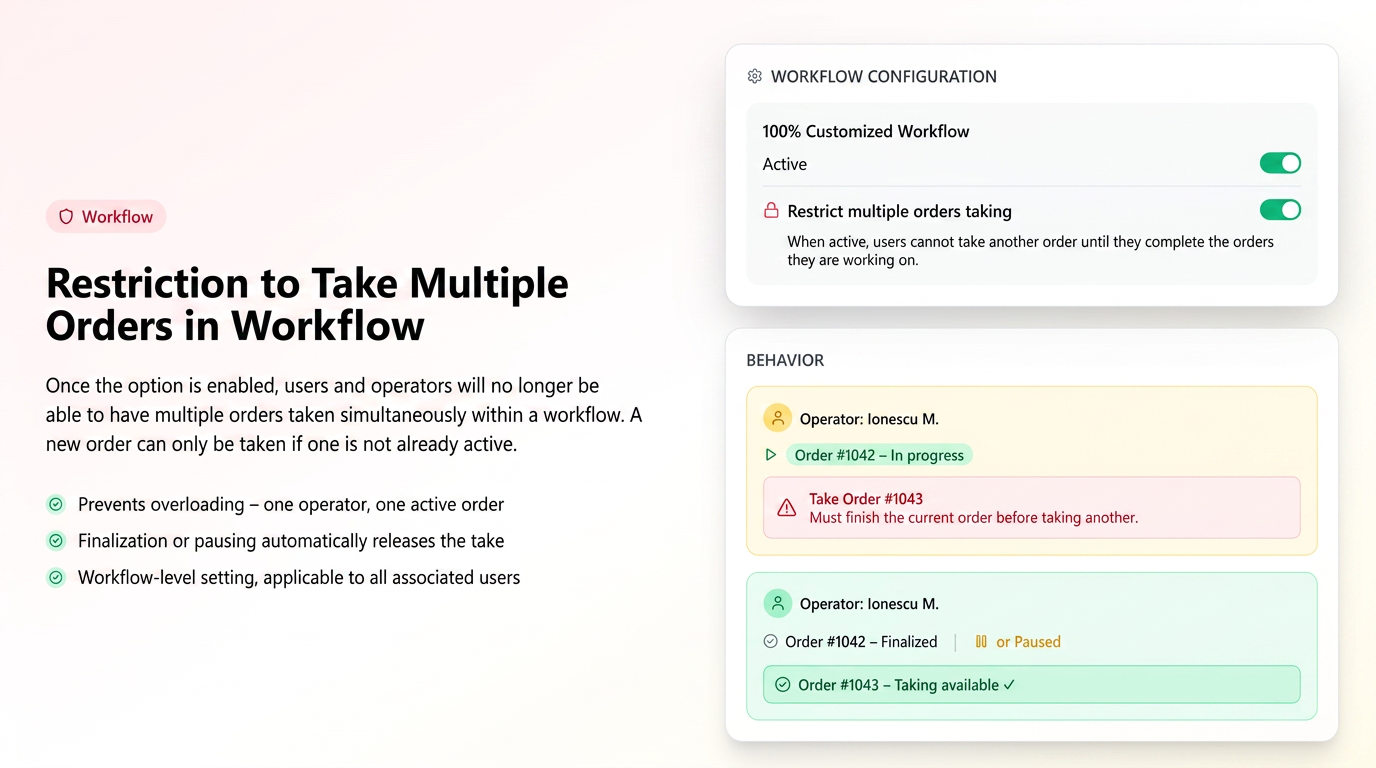
By activating the Restrict multiple order pickup option in a workflow configuration, associated users and operators will no longer be able to have multiple orders picked up simultaneously within that workflow.
The user can pick up a new order only if they do not already have an active order (in progress). If the stage of an order is completed or paused, they can pick up another order.
How to use
In the workflow configuration (settings – workflow – edit current workflow), enable the Restrict multiple order pickup option.
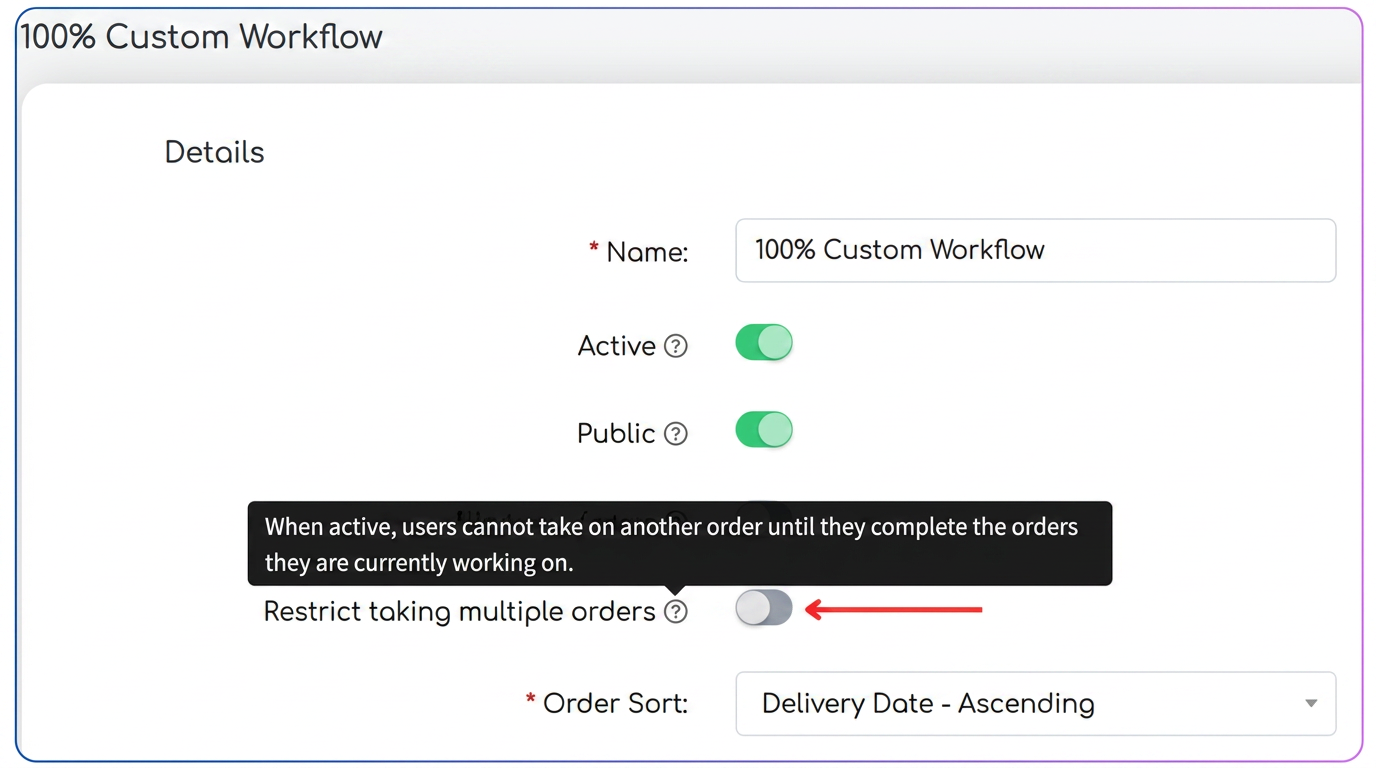
After activation:
- the user cannot pick up a new order if they already have an active one in progress
- when attempting to pick up, the system will display the message:
“You must complete the current order before picking up another one.”
If the option is disabled:
- users can pick up multiple orders in parallel, as per standard behavior
Notes:
- If an order is completed or the stage is paused, the user can pick up another order
- \x3Cimg src=\"/__l5e/assets-v1/3bdf47fa-2467-4acf-927e-ed205268a8a0/en-b10-u56.png\"/>\x3C/p> \x3Cp>\x3Cspan style=\"font-size:12pt\">\x3Cspan style='font-family:\"Times New Roman\",serif'>By activating the \x3Cstrong>Restrict multiple order pickup\x3C/strong> option in a workflow configuration, associated users and operators will no longer be able to have \x3Cstrong>multiple orders picked up simultaneously\x3C/strong> within that workflow.\x3C/span>\x3C/span>\x3C/p> \x3Cp>\x3Cspan style=\"font-size:12pt\">\x3Cspan style='font-family:\"Times New Roman\",serif'>The user can pick up a new order only if they do not already have an active order (in progress). If the stage of an order is \x3Cstrong>completed or paused\x3C/strong>, they can pick up another order.\x3C/span>\x3C/span>\x3C/p> \x3Ch3>\x3Cspan style=\"font-size:14pt\">\x3Cspan style='font-family:\"Times New Roman\",serif'>\x3Cspan style=\"color:#0f4761\">How to use\x3C/span>\x3C/span>\x3C/span>\x3C/h3> \x3Cp>\x3Cspan style=\"font-size:12pt\">\x3Cspan style='font-family:\"Times New Roman\",serif'>In the workflow configuration (settings – workflow – edit current workflow), enable the \x3Cstrong>Restrict multiple order pickup\x3C/strong> option.\x3C/span>\x3C/span>\x3C/p> \x3Cp>\x3Cimg src=\"/__l5e/assets-v1/e561ba4f-0bf8-4d8a-be39-8444080011a0/en-b10-u57.png\"/>\x3C/p> \x3Cp>\x3Cspan style=\"font-size:12pt\">\x3Cspan style='font-family:\"Times New Roman\",serif'>After activation:\x3C/span>\x3C/span>\x3C/p> \x3Cul> \x3Cli>\x3Cspan style=\"font-size:12pt\">\x3Cspan style='font-family:\"Times New Roman\",serif'>the user cannot pick up a new order if they already have an active one in progress\x3C/span>\x3C/span>\x3C/li> \x3Cli>\x3Cspan style=\"font-size:12pt\">\x3Cspan style='font-family:\"Times New Roman\",serif'>when attempting to pick up, the system will display the message:\x3Cbr/> “You must complete the current order before picking up another one.” \x3C/span>\x3C/span>\x3C/li> \x3C/ul> \x3Cp>\x3Cspan style=\"font-size:12pt\">\x3Cspan style='font-family:\"Times New Roman\",serif'>If the option is disabled:\x3C/span>\x3C/span>\x3C/p> \x3Cul> \x3Cli>\x3Cspan style=\"font-size:12pt\">\x3Cspan style='font-family:\"Times New Roman\",serif'>users can pick up multiple orders in parallel, as per standard behavior\x3C/span>\x3C/span>\x3C/li> \x3C/ul> \x3Ch3>\x3Cspan style=\"font-size:14pt\">\x3Cspan style='font-family:\"Times New Roman\",serif'>\x3Cspan style=\"color:#0f4761\">Notes:\x3C/span>\x3C/span>\x3C/span>\x3C/h3> \x3Cul> \x3Cli>\x3Cspan style=\"font-size:12pt\">\x3Cspan style='font-family:\"Times New Roman\",serif\">The restriction applies only to orders simultaneously in progress (actively picked up)\x3C/span>\x3C/span>\x3C/li> \x3Cli>\x3Cspan style=\"font-size:12pt\">\x3Cspan style='font-family:\"Times New Roman\",serif'>If an order is completed or the stage is paused, the user can pick up another order\x3C/span>\x3C/span>\x3C/li> \x3Cli>\x3Cspan style=\"font-size:12pt\">\x3Cspan style='font-family:\"Times New Roman\",serif\">The setting is saved at the workflow level and applies to all users/operators associated with it\x3C/span>\x3C/span>\x3Cbr/> \x3C/li> \x3C/ul> \x3Cp> \x3C/p>",answers:$R[870]=[],roSlug:"restrictie-preluare-multiple-comenzi-in-flux",enSlug:"restriction-on-picking-up-multiple-orders-in-workflow",updatedAt:"2026-09-03T08:20:09.161731+00:00",locked:!1,source:"askbot"},ssr:!0}]})($R["tsr"])
