
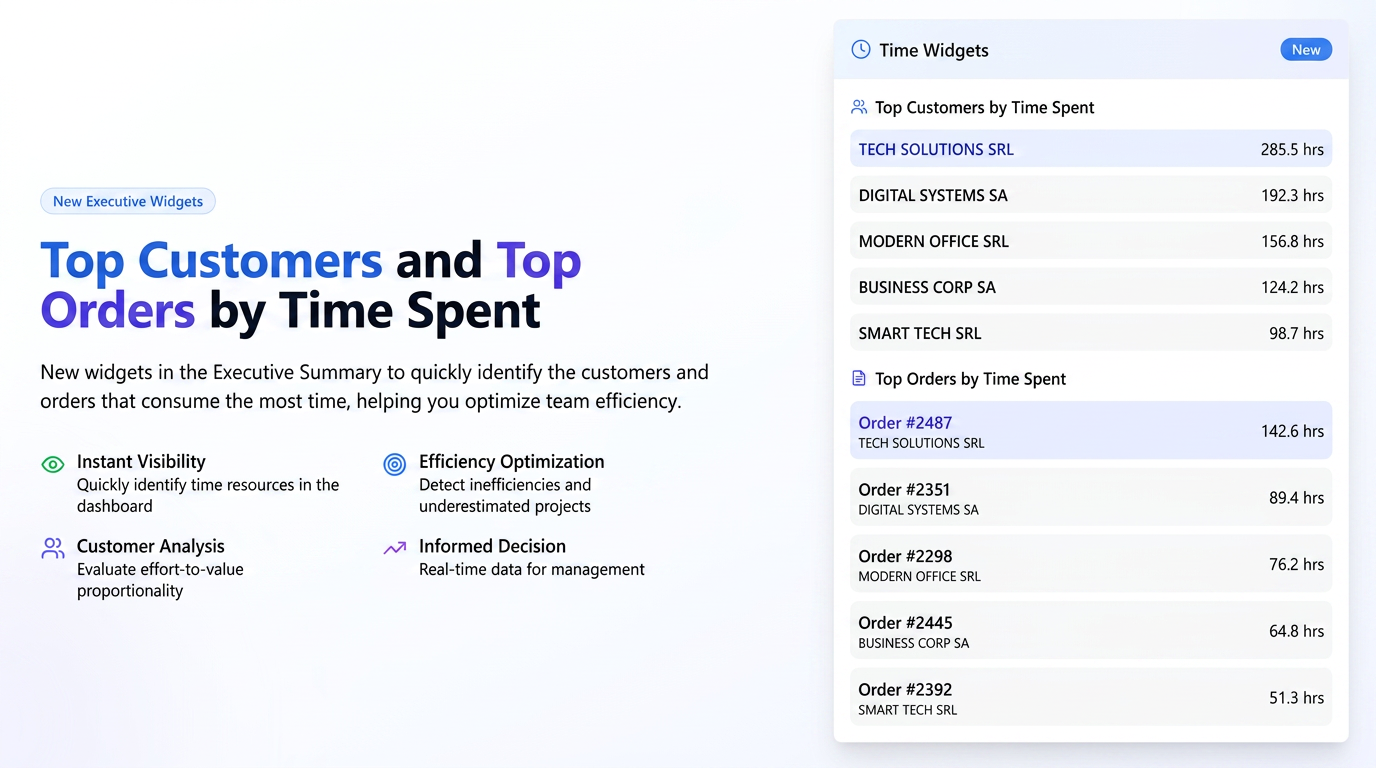
These two new widgets provide a clear and immediate perspective on how the team's time is distributed.
- "Who are the customers consuming most of our time?" – The "Top Customers" widget helps you identify customers requiring the most effort, allowing you to evaluate if this consumption is proportional to the value they bring.
- "Which orders or projects are the biggest time consumers?" – The "Top Orders" widget highlights specific projects absorbing the most time resources, being an excellent tool for detecting possible inefficiencies, underestimated projects, or the need to adjust internal processes.
Step-by-step User Guide
These widgets are designed to provide information at a glance and do not require configuration. Their use is intuitive:
- Location: You will find the two new widgets in the main dashboard (Executive Summary), alongside the other analysis cards.
- "Top Customers by Allocated Time" Widget:
- This card displays a list of your customers, sorted in descending order based on the total time worked on their orders.
- The displayed metric represents the sum of all hours clocked by all employees on orders belonging to that respective customer, within the time period selected in the Executive Summary filters (e.g., "Today", "This month").
- "Top Orders by Allocated Time" Widget:
- This card presents a ranking of individual orders, prioritized by total time consumption.
- Each entry displays the order number and the associated customer.
- The displayed value represents the total sum of hours clocked by all employees who worked on that specific order during the selected period.