
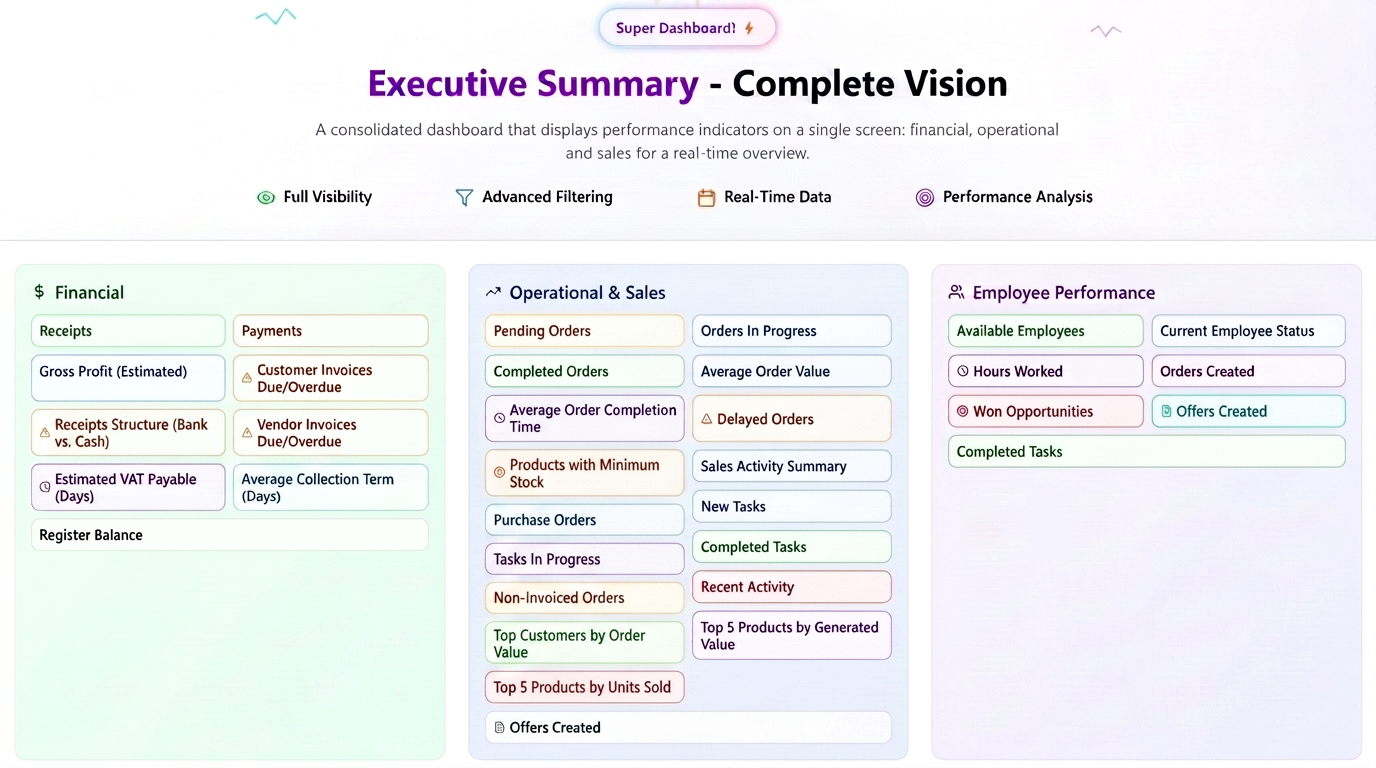
On a single screen, this report consolidates performance indicators from the financial, operational, and sales departments, providing a real-time overview of general performance.
Access and Permissions:
- To access this report, navigate in the main menu to Reports -> Executive Summary.
- If the option is not visible, it means the current user does not have the necessary permissions. Only an administrator can grant access by navigating to Financial -> Employees -> Permissions, editing the desired access level, searching for "Executive Summary", and enabling the view permission.
Filtering and Configuration:
- Period Filtering: Data can be filtered by predefined periods (Today, This Week, This Month, This Year) or a Custom Period can be selected from the calendar.
- *Panel Configuration: By pressing the Configure button (top-right), the panel can be customized:
- Reorganization: Modules (widgets) can be moved and rearranged via drag-and-drop.
- Visibility: Modules that are not of interest can be hidden by clicking the 'x' icon.
- After configuration, changes are saved using the Save Configuration button.
"Financial" Section
Receipts
- Total amounts collected in the selected interval, calculated based on "receipt" type transactions dated within this interval.
Payments
- Total amounts paid in the selected interval, calculated based on "payment" type transactions dated within this interval.
Gross Profit (Estimated)
- Estimated profit, calculated as the difference between the sum of created order values and the cost of products, expenses, and expenses without documents.
Due/Overdue Customer Invoices
- The total number of customer invoices with an "Overdue" status or a due date of today, and the outstanding amounts. Invoices in both EUR and EUR are included (if applicable). This data reflects the current situation (today) and is not affected by the period filter selected for the rest of the report.
Due/Overdue Supplier Invoices
- The total number of supplier invoices with an "Overdue" status or a due date of today, and the outstanding amounts. Invoices in both EUR and EUR are included (if applicable). This data reflects the current situation (today) and is not affected by the period filter selected for the rest of the report.
Estimated VAT Payable
- The total VAT amount from invoices issued in the selected interval minus the VAT amount from purchases issued in the selected interval.
Average Collection Period (Days)
- The average number of days required to collect an invoice, calculated as the average of the differences between the invoice creation date and the date of the last receipt, for invoices created in the selected interval.
Receipt Structure (Bank vs. Cash)
- Distribution of receipts made via bank versus those in cash, within the selected interval.
Register Balances
- This data reflects the current situation (today) and is not affected by the period filter selected for the rest of the report.
"Operational & Sales" Section
Pending Orders
- Orders entered into the system ("New" status) for which no operational stage has yet been marked as "in progress" or "completed". This data reflects the current situation (today) and is not affected by the period filter selected for the rest of the report.
Orders In Progress
- Orders that have at least one stage marked "in progress" but are not yet fully completed. Each order may be counted multiple times if it is active in several stages. The percentage is calculated as a ratio of the number of orders in progress per stage out of the total in progress in that workflow. This data reflects the current situation (today) and is not affected by the period filter selected for the rest of the report.
Completed Orders
- The number and total value of orders marked as completed in the selected period.
Average Order Value
- The average value of orders created in the selected period, calculated as the ratio between the total value and the number of orders created in this interval.
Average Order Completion Time
- The average time required to complete an order, calculated as the average of the differences between the creation date and the completion date of orders finished in the selected period.
Delayed Orders
- For the "Today" filter: orders currently delayed. For other period filters: the number of orders whose delivery deadline was in the selected interval and which were or are delayed relative to that deadline.
Products with Minimum Stock
- Products with stock below the set minimum threshold and the last stock update within the selected interval.
Sales Activity Summary
Independent totals are displayed for: New leads added, Opportunities created, Quotes created, and Orders registered.
Supplier Orders
- The number of orders sent to suppliers in the selected period.
New Tasks
- The total number of new tasks created in the selected interval.
Tasks In Progress
- The number of tasks that had at least one action started and were not completed by the end of the selected interval.
Completed Tasks
- The number of tasks marked as completed in the selected interval.
Uninvoiced Orders
- The number of orders created in the selected interval for which no invoice has been issued by the end of the selected interval. For the "Today" filter, all uninvoiced orders are included. Canceled orders are excluded.
Recent Activity
- Displays the latest user actions (creations, edits, deletions) for relevant documents and entities. This data reflects the current situation (today) and is not affected by the period filter selected for the rest of the report.
Top Customers by Order Value
- Top 5 customers by the total value of orders completed in the selected period
Top 5 Products by Generated Value (Revenue)
- Top 5 products by revenue (excluding VAT) generated from completed orders
Top 5 Products by Units Sold
- Top 5 products by total quantity sold (units) from completed orders
Quotes Created
- Total number of quotes created in the chosen period, grouped by status (e.g., New, Accepted, Refused, etc.)
"Employee Performance" Section
Available Employees
- List of currently active/available employees. This data reflects the current situation (today) and is not affected by the period filter selected for the rest of the report.
Current Employee Status
Indicates the work state and availability of the employee in real time. Possible states are:
- Active: The employee is currently clocked in on an order or task.
- Available: The employee is not currently clocked in on any activity.
- Leave (or similar status): The employee is not available for work, being on leave.
Hours Worked
- The total number of hours worked by the employee in the selected interval, similar to the calculation method in Employee Reports.
Orders Created
- The number of orders created by the selected employee in the specified period.
Opportunities Won
- The number of opportunities created by the employee with "Quote Accepted" or "Order" status, for which a quote or order was created in the selected period, along with their total value.
Quotes Created
- The number of quotes created by the selected employee in the selected interval.
Completed Tasks
- The number of tasks completed by the selected employee in the specified interval.