
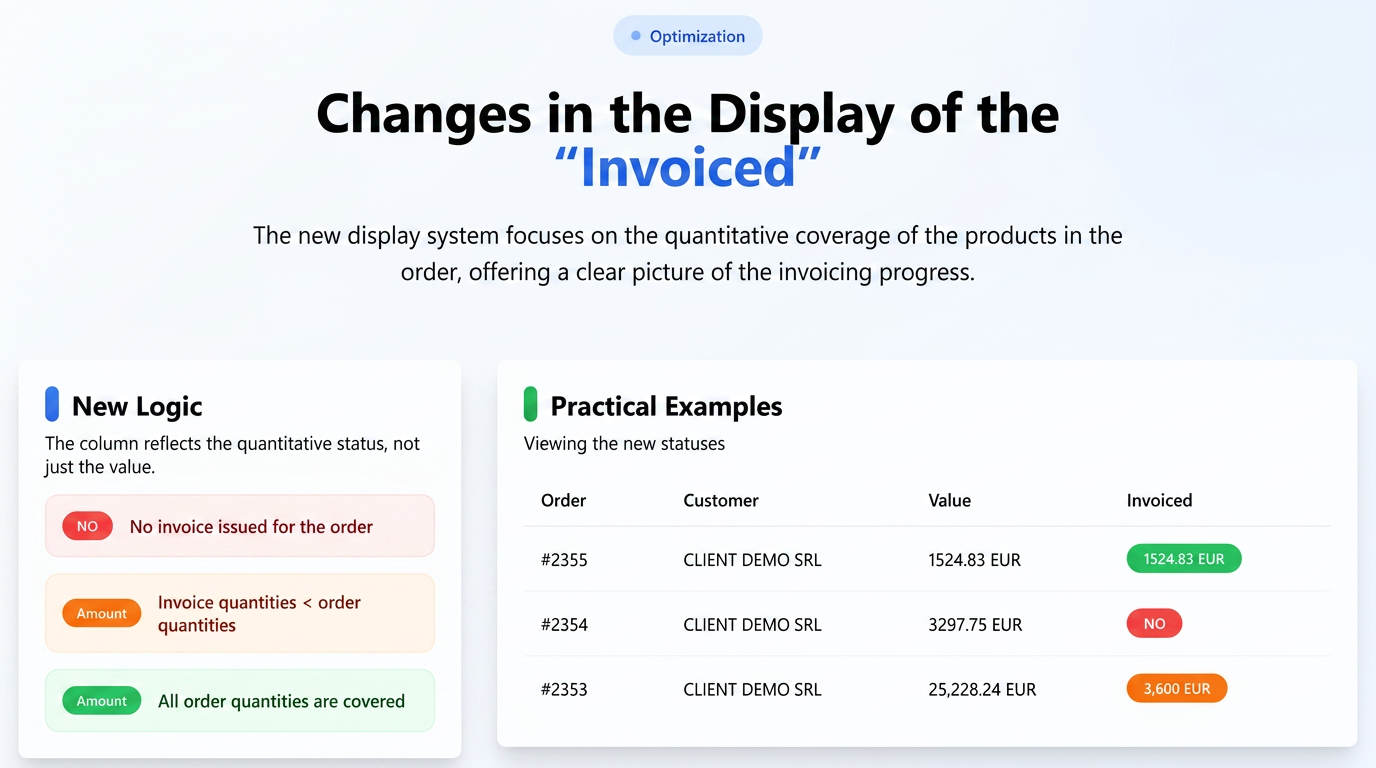
The "Invoiced" column in the Orders section provides a clear overview of the invoicing status for each order, with a specific focus on the quantitative coverage of the ordered products through issued invoices. The status functions as follows:
-
RED BORDER (with the text "NO"):
-
Meaning: Indicates that no invoice has been issued associated with that specific order.
-
Visual: The text "NO" is displayed on a red background.
-
-
ORANGE BORDER (with the Invoiced Amount):
-
Meaning: Signals that one or more invoices have been issued for the order, but the total quantity of products on these invoices is less than the total quantity of products in the order. This reflects partial invoicing from a quantitative perspective, even if, for example, the invoiced value (via an advance payment) might cover the entire value of the order.
-
Visual: The total amount invoiced up to that point is displayed on an orange background.
-
Example: For an order containing 10 units of a product, if an invoice is issued for 5 units, the "Invoiced" column will display the value corresponding to those 5 units on an orange background.
-
-
GREEN BORDER (with the Invoiced Amount):
-
Meaning: Shows that one or more invoices have been issued for the order, and the total quantity of products on these invoices fully covers the quantity of products specified in the order. This indicates complete invoicing from a quantitative perspective.
-
Visual: The total invoiced amount is displayed on a green background.
-
Important Note: Even if small value differences may occur (for example, due to exchange rate fluctuations or discounts applied later on the invoice), as long as ALL quantities in the order are covered by the issued invoices, the background will be green.
-
This approach to the "Invoiced" status allows you to accurately track whether the products in an order have been fully invoiced quantitatively, providing a complete picture of the delivery and invoicing process.