
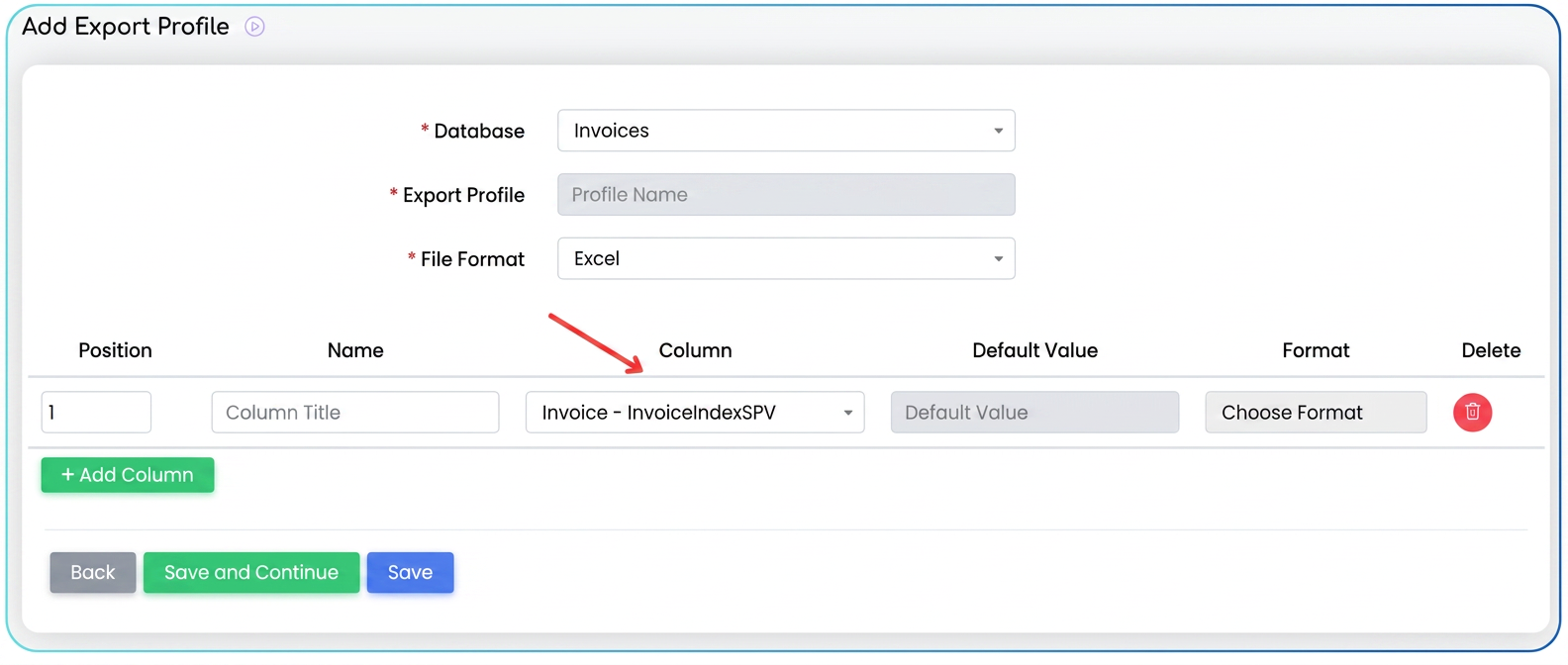
This optimization improves the data export functionality within the section. You now have the possibility to include the unique upload index of the invoice in the national e-Factura system (SPV) in your exported files. This index, named FacturaIndexSPV in the export settings, is automatically retrieved for each invoice that has been successfully transmitted to ANAF via e-Factura. For invoices that have not yet been sent or do not have an associated SPV index, the respective field will remain empty in the exported file. Configuration is done by editing or creating a specific export profile for invoices.
To include the e-Factura (SPV) index in your invoice exports, follow these steps:
- Navigate to Settings in the main menu.
- Select the Data Export option.
- Access the Export Profiles section.
- Identify the export profile you use to export data from Invoices.
- Click on the Edit icon (pencil) next to the desired export profile.
- On the profile editing screen, scroll down to the column definition section.
- Click the green + Add Column button.
- A new row for column configuration will appear:
- Name: Enter the name you want the column to have in your file.
- Column: This is the most important step. Click on the dropdown field and search for and select the option Factura - FacturaIndexSPV. This is the internal variable containing the index from SPV.
- After configuring the new row, press the Save button (or Save and Continue) to record the changes to the export profile.
Related articles
Invoices: New Column: Overdue DaysTutorialsWe need to export invoices in an editable format for translation. We send invoices to the client in EnglishForumHow can I check more quickly if an invoice has been uploaded to SPV? When viewing invoices in e-Factura, the upload index and download index do not appear. I have one or two clients who request the upload index when I send invoices via email.ForumSecurity — limiting data export by access levelTutorialsAutomatic Multiple Due Date Generator for InvoicesTutorials