
To view supplier invoices received in SPV and to quickly transform them into purchases in iflows, follow the steps below:
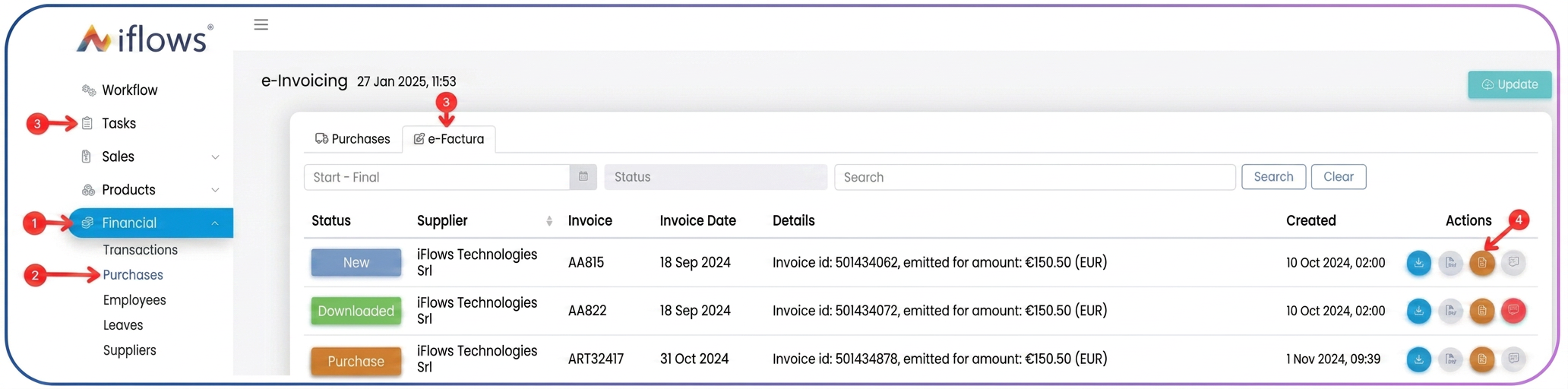
- From the side menu, go to Financial.
- Select Purchases.
- At the top, you will notice two tabs:
- Purchases – incoming invoices already entered into the system.
- e-Factura – invoices issued by your suppliers and automatically received via e-Factura.
Note: To quickly create a purchase based on an invoice received in e-Factura, click the button in the actions column ”Create Purchase” corresponding to the desired invoice. All fields will be automatically populated in the new purchase.
Note: iflows automatically updates the list of invoices received from e-Factura every hour. If you want an immediate refresh, you can use the Update button at the top-right of the screen.
Related articles
Supplier orders — requirements from client ordersTutorialsGenerating Stock Purchase from Supplier OrderTutorialsAssociating a Purchase Order with a Stock PurchaseTutorialsSupplier orders — tags for organizing and filtering ordersTutorialsTransferring payments from supplier order to purchaseTutorials